


Pixel Art - Color by Number
4.6143.47K Reviews
App Specs
- Version
- 10.9.1
- Updated On
- License
- Free
- Downloads
- 100,000,000+
- Developer
- Easybrain
- Categories
- Puzzle
- Platform
- Android, iOS
Screenshots


 Analysis by AppCompare
When I have a few spare minutes and want something simple to focus on, I like the quick clarity of tapping numbered squares into color. Pixel Art - Color by Number is a puzzle game from Easybrain that turns that small action into a gradual reveal: choose a picture, match its numbers to colors, and watch the image take shape. It is free to download, rated for Everyone, and has a 4.6 average from around 2.6 million ratings. That scale suggests it has found a broad audience, but what matters to me is that the basic activity is easy to understand without demanding a long session.
A small task that gets going quickly
The appeal is immediate: there is no complicated puzzle to learn before I can begin. Each picture is divided into numbered cells, and the color palette tells me what to fill. The game gives my attention one clear job at a time, which makes it a natural fit for a short break rather than an activity I have to plan around.
That simplicity is also the main trade-off. This is not a drawing tool where I choose every color or invent a composition. The finished image is already designed; my role is to complete it by following the number guide. If I want open-ended creativity, a blank canvas or a conventional coloring app will suit me better. If I want a low-pressure task with a visible finish, this format makes more sense.
Getting Started with Pixel Art
First things first, grabbing Pixel Art - Color by Number from the app store is a breeze. It's available for both Android and iOS, so no one gets left out. Once you've got it installed, the app gives you a quick tour, which is super helpful if you're new to the whole color-by-number scene.
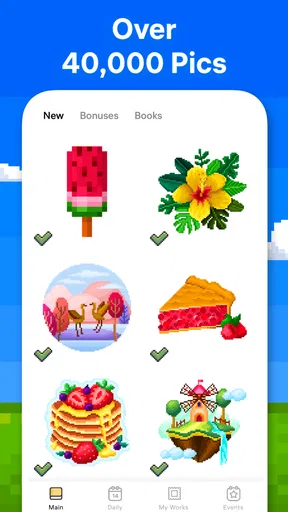
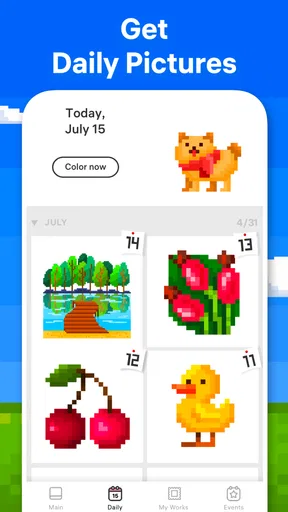
The interface is clean and user-friendly. You're greeted with a gallery full of black and white images waiting for you to bring them to life. The images range from simple to complex, so you can start easy and work your way up as you get more confident.
The Coloring Experience
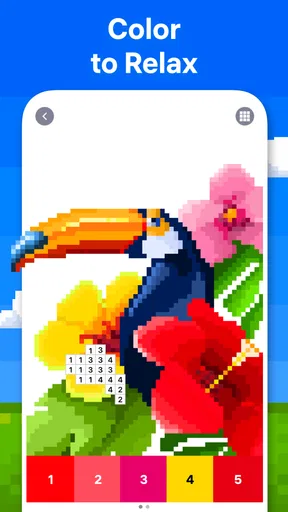
Let me tell you, the process of coloring by numbers is oddly satisfying. You select an image, and it zooms in to show a grid of tiny squares, each with a number. Each number corresponds to a color. All you have to do is tap the color at the bottom of the screen and then tap on the corresponding numbered squares. It’s like magic watching the picture come to life!
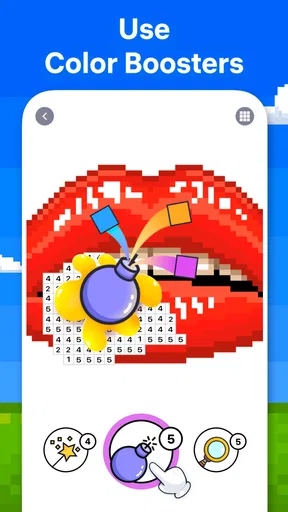
The app also has a neat feature where it will automatically find the next empty square for the color you selected. So if you're feeling a little lazy or just want to speed things up, it’s got your back. And if you make a mistake, don’t sweat it; there’s an undo button to save the day.
Worth Reading Before You Choose

Flipboard Shows What News Apps Must Do Beyond the Feed

Switching to Android Auto Means Rethinking Your Driving Routine

Google Calendar Makes a Crowded Week Easier to Manage

Ludo King Makes the Most of the Minutes Between Plans

Baby Panda World Brings Quick Play to Modern Phones, but Its Game Library Feels Busy

ESPN’s Live Game View Makes Following Close Games Easier
Why I Love It
Okay, here's the deal. I love Pixel Art - Color by Number because it's more than just a coloring app. It’s a stress-buster. Whenever I feel overwhelmed, I just spend a few minutes filling in those little squares, and it’s like a mini-vacation for my mind. Plus, the app updates regularly with new images, so there’s always something fresh to color.
Another thing I appreciate is the variety in the image library. Whether you’re into animals, landscapes, or abstract art, there's something for everyone. It’s like having a never-ending coloring book in your pocket.
Making short sessions work for you
I find the easiest way to fit this into a busy day is to treat one color as a tiny task. Rather than expecting to finish a whole picture, I can select a color, fill several matching cells, and stop when I need to move on. The automatic search for the next empty square helps when I want to keep a rhythm, while choosing a different color gives me a natural point to pause. This is a useful distinction: the game can feel orderly without requiring me to complete an image in one sitting.
For example, if I have a few minutes while waiting for a ride or winding down after dinner, I can make visible progress without having to remember a story, a level strategy, or a long chain of moves. The activity is easy to resume because the picture itself shows what remains. I still need to be comfortable looking closely at small cells, though; on a small screen or when I am tired, the detailed sections can feel more fiddly than relaxing.
Pause, return, and choose a sensible stopping point
One practical way to avoid turning a relaxing pastime into a chore is to stop at a clear boundary: after finishing a color, after completing a recognizable part of the picture, or simply when my break ends. The numbered grid makes it easier to pick up the same image again than a freehand drawing would be, because I can see which cells are still unfilled. I would not start a particularly intricate picture if I only had a moment and knew I would be annoyed by leaving it unfinished; a simpler design is a better match for that kind of gap.
It is also worth separating the pleasure of the activity from the expectation of constant novelty. The satisfaction comes partly from repeating a simple action and watching a picture emerge, so a session can still be enjoyable even when I am not chasing a new image. If I want a puzzle that tests deduction or changes its rules as I play, this is not that. Its challenge is mostly patience, visual attention, and steady completion.
Things to Keep in Mind
Now, it wouldn’t be a fair review if I didn’t mention a few things to watch out for. While the app is free to download, it does have some ads. They’re not too intrusive, but if they bother you, there’s an option to remove them with a small fee.
Also, if you’re someone who likes to color offline, you might need to plan ahead. The app requires an internet connection to download new images. So if you’re heading somewhere without Wi-Fi, make sure to download your images beforehand.
Who will enjoy it, and who may want something else
I think this is a good fit for people who enjoy a calm, repetitive activity and like seeing a picture emerge from small steps. It can work well as a brief screen break, a quiet evening pastime, or something to do while waiting, especially for someone who does not want to learn complex controls. Easybrain has made a puzzle that is approachable rather than demanding, and the Everyone rating reflects its broad, casual audience.
It is less suited to players who need frequent surprises, competitive goals, or a strong sense of problem-solving. Compared with a traditional jigsaw puzzle, the color-by-number grid removes much of the searching and spatial decision-making; compared with a freehand art app, it offers much less creative control. Those are not flaws so much as the boundaries of its appeal. I would pick it when I want gentle structure, and choose another kind of puzzle when I want to be challenged by new rules or make the artistic decisions myself.
The game is free, with in-app purchases listed from $5.49 to $46.99 per item. I would approach optional spending as a convenience choice, not something needed to understand the core activity. If ads interrupt your flow, consider whether removing them is worth it to you; if you are only trying the game casually, there is no need to decide that before you know whether the coloring routine suits you. The current version is 10.7.0, and it supports devices running Android 8.0 or later.
Wrapping It Up
Overall, Pixel Art - Color by Number is a delightful app that combines the joy of coloring with modern technology. It’s perfect for anyone looking to unwind or just pass the time creatively. Whether you’re a coloring enthusiast or just curious, give it a shot. Who knew coloring by numbers could be so much fun?
Ready to start coloring? You can find the download links for Android and iOS right here on our site. Happy coloring!
For me, the strongest reason to try it is its short-session clarity: I can open a picture, make progress with a few deliberate taps, and leave without needing to keep a complicated game state in my head. It may not hold the attention of someone looking for deep mechanics, and the repeated coloring can become monotonous if that steady rhythm is not your thing. But for a casual player who enjoys small, visible progress, it is an easy recommendation. The game was released on October 16, 2017, and its more than 100 million installs show how widely this uncomplicated format has travelled.
Pros
- Easy and intuitive interface for all ages.
- Vast library of pixel art templates.
- Offline mode available for coloring anywhere.
- Regular updates with new images.
- Relaxing and stress-relieving experience.
Cons
- Ads can be intrusive during use.
- Limited free images without purchase.
- No custom image upload option.
- Some features locked behind a paywall.
- Color choices can feel repetitive.
FAQs for Pixel Art - Color by Number
What is Pixel Art - Color by Number?
Pixel Art - Color by Number is a creative app that allows users to color various images using a number-based system. Each pixel in an image is marked with a number that corresponds to a specific color, making it easy and fun to create detailed artwork. Ideal for stress relief and creative expression, it's suitable for all ages.
Is Pixel Art - Color by Number free to use?
The app is free to download and offers a variety of images available at no cost. However, it also includes in-app purchases and subscriptions that provide access to premium content, such as exclusive images and advanced features. Users can enjoy the basic features without any purchase, but premium options enhance the experience.
Can I use Pixel Art - Color by Number offline?
Yes, Pixel Art - Color by Number can be used offline, making it convenient for on-the-go creativity. Once you've downloaded the images you want to color, you can access them without an internet connection. However, downloading new images or accessing certain features may require connectivity.
How user-friendly is Pixel Art - Color by Number for beginners?
The app is designed with user-friendliness in mind, making it perfect for beginners. It features a straightforward interface where users simply match numbered pixels with the corresponding colors. The intuitive design ensures that users of all skill levels can easily navigate and enjoy the coloring experience.
Does Pixel Art - Color by Number offer a variety of images?
Yes, the app provides a wide range of images across various categories such as animals, landscapes, and mandalas. Regular updates introduce new content, ensuring users always have fresh images to color. This variety caters to different interests and keeps the app engaging over time.


